
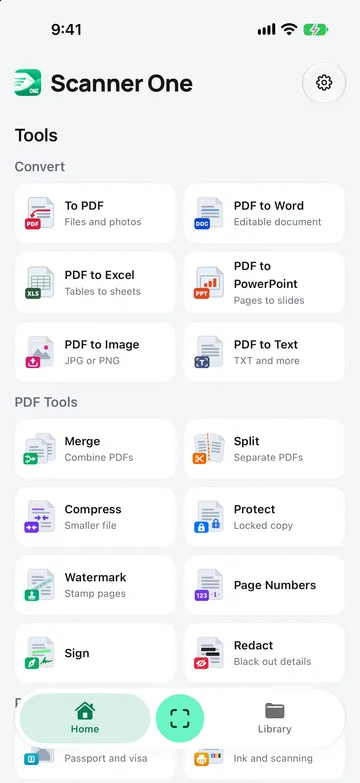
The PDF tools live in two places: on a document, under More, and on Home, where each tool is a card. Start from the document when you have it open; start from Home when you know the job and need to pick the file.
The tools
| Tool | What it does |
|---|---|
| Merge | Joins documents into one PDF, in the order you choose |
| Split | Cuts a PDF into page ranges, or one file per page |
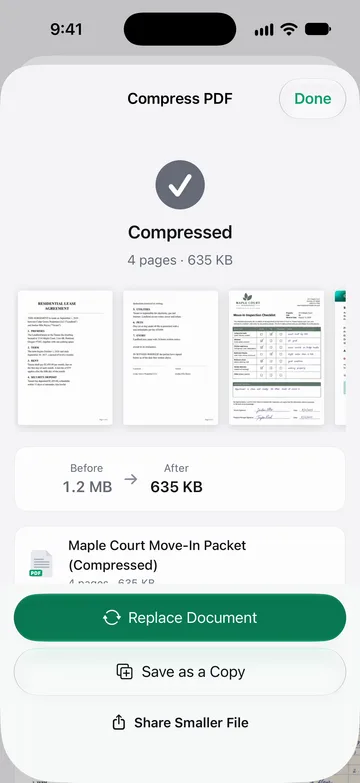
| Compress | Makes the file smaller and shows the new size before you keep it |
| Protect | Saves a copy that needs a password to open |
| Page Numbers | Adds numbers in the style and corner you pick |
| Watermark | Puts text such as CONFIDENTIAL across each page |
| Pages | Reorder, rotate, delete, duplicate or extract pages |
Export to any format
Share on a document opens Share & Export: PDF, Word, Excel, PowerPoint, CSV, Text, JPG, PNG, Long Image, Markdown, Rich Text and Web Page. Word export keeps headings, lists and tables, so you can edit the text instead of retyping it.
Bring files in
Word, Excel, PowerPoint, Pages, Numbers, Keynote, RTF, text and web pages open as PDFs when you import them, and photos become PDF pages.
PDF tools and Word, Excel, PowerPoint and CSV exports share one free allowance of 3 a week. Sharing a PDF, an image or text is always free. Free exports carry a small “Scanned with Scanner One” mark; Pro removes it.