
Every page you scan is read on your iPhone as it’s saved. The PDF gets a real text layer, so you can search it, select it and copy from it, here and in any other app that opens it.
Search that looks inside the paper
Type a word in the Library’s search and Scanner One finds it in document names and inside their pages. Each result shows the line it was found on and the page number. Open one and the Reader goes straight to that page with the words highlighted.
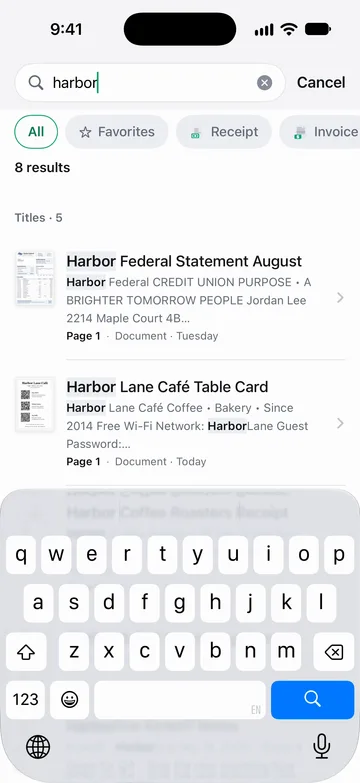
Text you can use
- Copy text from a whole page, or draw a box with Select Area to read just one part.
- Make Searchable reads a PDF that arrived as pictures only, so it can be searched too.
- Export the text as plain text, or as a Word document with headings, lists and tables kept.
What else it reads
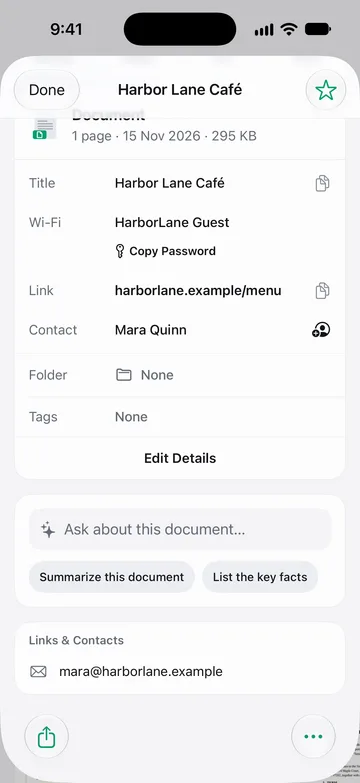
- Codes. QR codes and barcodes are found on every page: a link, a Wi-Fi network, contact details.
- Business cards. The name, number, email and company go straight to Contacts.
- Details. On invoices, pay stubs and IDs, the amounts and dates are pulled out where you can copy them.
- Listen. Any document can be read aloud.
Languages
Text recognition reads 29 languages and runs on the device, so it works without a connection.