Scan each receipt soon after you get it, choose the Receipt filter, and save it. Scanner One reads the shop, the date, the total and the tax from each one, so at tax time you can find receipts by any word on them and merge a year’s worth into a single PDF for whoever does your taxes. Don’t wait: receipts printed on thermal paper fade, and a scan only keeps what’s still legible.
The free way
Scan Documents in Files saves each receipt as a PDF in the folder you choose (Apple’s steps). Make a folder for each tax year and name each file as you save it. That works for a handful. With a shoebox full, it’s slow: every file needs a name, and every total still has to be typed into a spreadsheet.
Scan receipts with Scanner One
-
Lay the receipt flat
Tap Scan Now. Smooth the receipt out on a dark surface so its edges stand out, and let AUTO take it. A long receipt that only fits from far away comes out with tiny print: shoot it as 2 pages instead, top half then bottom half, with Scan more pages.
-
Choose Receipt
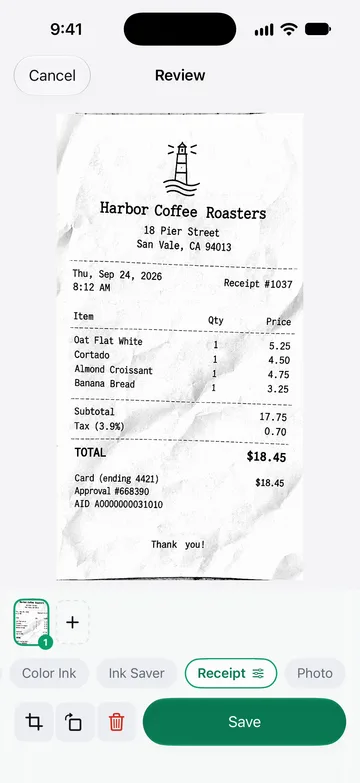
In Review, swipe the filter chips and tap Receipt: a gray page with high contrast and the strongest sharpening of all the filters, made for the faint print of store receipts on crumpled paper. If the creases turn into dark lines, tap Receipt again and lower its strength.
-
Save, and check what it read
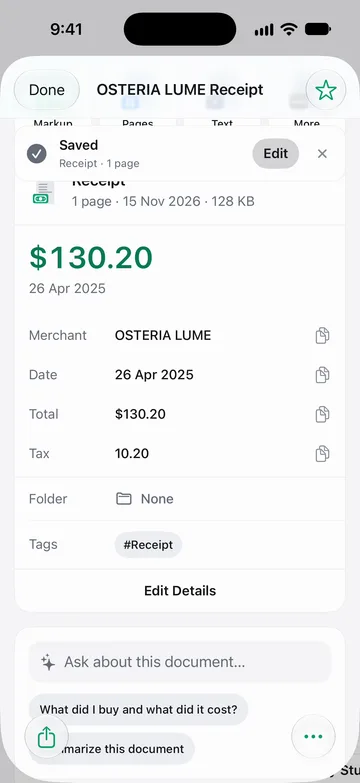
Tap Save. The receipt opens with what Scanner One read: the total and the date at the top, then Merchant, Date, Total and Tax, each with a copy button, and a Receipt tag.
-
Find them at tax time
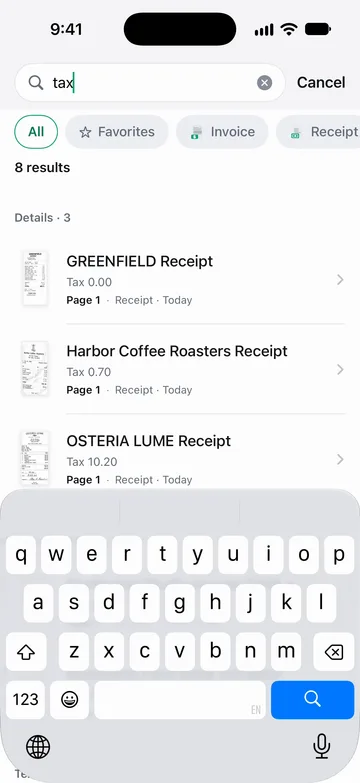
In the Library, type a shop’s name, an item or just “tax” into the search. Each result shows the line or detail that matched and the page it’s on, and the Receipt chip narrows the list to receipts.
-
Send them as a single PDF
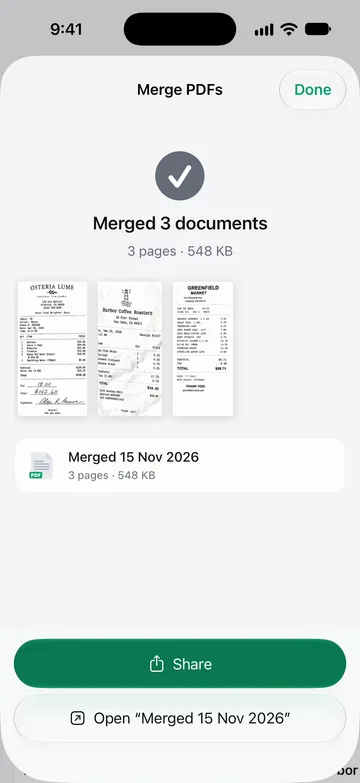
In the Library, tap Select, tick the receipts and tap Merge. You get one PDF (“Merged 3 documents”), saved in the Library, to Share with your accountant.
How long to keep them, and the paper
- Scans count when they’re legible. The IRS applies the same rules to records kept electronically as to paper ones: they must be legible, and you must be able to find and reproduce them (IRS Publication 583, which points to Revenue Procedure 97-22 for the details).
- How long. Generally 3 years after you file; 6 years if you leave out income worth more than 25% of what your return shows; 7 years if you claim a loss from worthless securities or a bad debt (IRS: How long should I keep records?).
- The paper originals. Publication 583 says a business should throw away paper records only after testing that its electronic copies meet the IRS’s requirements. Whether you can throw out yours is a question for your tax preparer.
- In the UK, self-employed people keep records for at least 5 years after the 31 January deadline for that tax year (GOV.UK).
Scanning, the Receipt filter and search have no limit on the free plan. Reading the details and naming each receipt is part of smart filing, free for 10 documents a month; after that, receipts are saved as “Scan” with the date and can still be found by any word on them. Merge is one of the PDF tools, free 3 a week. On the free plan, a PDF you share carries a small “Scanned with Scanner One” mark on each page. Pro removes the limits and the mark.
If something goes wrong
- The total is wrong or missing. Scanner One reads the total from the printed line labeled Total, so a crease through that line, or print that has faded, can hide it. Flatten the receipt and retake it; the receipt’s whole text is in the PDF either way.
- The print is almost gone. Thermal paper fades with heat and light. Try B&W, which turns every faint mark it finds solid black, and scan the rest of the box now before it fades further.
- “Edges not found”. A white receipt on a white table has no edge to find. Tap Crop, then Auto Detect, or retake it on something darker.
- The receipt is named “Scan” and a date. This month’s free smart filing is used up. Tap Edit in the Saved banner, or Edit Details on the info card, to name it yourself; search still finds it by any word on it.