An electronic signature is any way of signing on a screen: a signature drawn with your finger, a typed name, a box ticked next to “I agree”. A digital signature is one kind of electronic signature that seals the file with a certificate issued to the signer, so anyone who opens it can check who signed and whether anything changed afterward. When you sign a PDF with Markup on iPhone, or with Scanner One, you make an electronic signature, not a digital one. For most everyday papers, such as a lease, an offer letter or a school form, that is usually all that’s needed.
The difference at a glance
| Electronic signature | Digital signature | |
|---|---|---|
| What it is | A picture of your signature, a typed name or a click | A seal made with a signing certificate |
| What shows who signed | The trail around it: whose email it came from, when, from which account | The certificate, and whoever issued it |
| If the file is changed later | Nothing on the page shows it | Apps that check signatures report the change |
| What you need | A finger, a stylus or a keyboard | A certificate, usually through a signing service |
Is an electronic signature legally binding?
For ordinary agreements, generally yes, with exceptions. This is general information, not legal advice: the rules for a particular document come from the law that governs it, and from whoever asked you to sign.
- United States. The federal Electronic Signatures in Global and National Commerce Act says a signature or contract “may not be denied legal effect, validity, or enforceability solely because it is in electronic form”. It leaves out wills, adoption and divorce papers, court documents and some notices, such as eviction and foreclosure notices. It also doesn’t require anyone to agree to sign electronically: the other side can ask for paper.
- European Union. The eIDAS regulation (Regulation (EU) No 910/2014) says an electronic signature “shall not be denied legal effect and admissibility as evidence in legal proceedings solely on the grounds that it is in an electronic form”. It names 3 levels: electronic, advanced and qualified. A qualified electronic signature, made with a qualified certificate, “shall have the equivalent legal effect of a handwritten signature”; the other 2 levels get no such guarantee.
- United Kingdom. Section 7 of the Electronic Communications Act 2000 makes electronic signatures admissible in evidence, and UK law kept the eIDAS rules quoted above.
When you need a digital signature
When the person, the form or the rule says so. A request for one usually comes as a link from a signing service, or as a PDF with a signature field that asks for a certificate. Use the service or certificate they name: a drawn signature can’t stand in for it. If you’re not sure, ask what they mean. Plenty of people say “digital signature” when any signature on a PDF will do.
Sign electronically in Scanner One
-
Open Markup and tap Sign
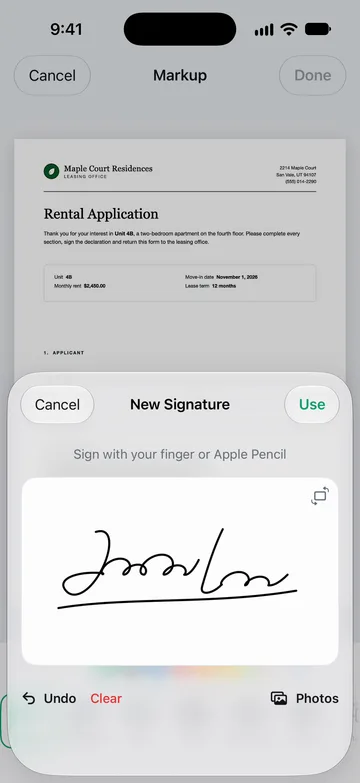
On the document, tap Markup, then Sign. Sign on the pad with a finger or Apple Pencil, tap Use, and drag the signature onto the line.
-
Send it as a PDF
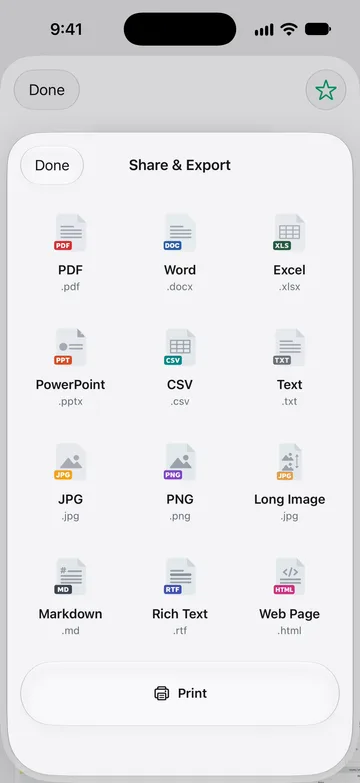
Tap Done, then Share and PDF. Every step, including signing on paper and scanning it in, is in how to sign a PDF on iPhone.
Scanner One makes electronic signatures only: it has no signing certificates, so it can’t make a digital signature. Nothing locks the page after you sign, so anyone with a PDF editor could change the file, as with any signature that isn’t sealed with a certificate. Protect puts a password on a copy, which controls who can open it, not who signed it. Signing is free for 3 documents a month; Pro removes the limit.
If something goes wrong
- The sender says your PDF has no digital signature. Right: a drawn signature isn’t one. Ask for the link from their signing service, or ask whether a signed PDF will do.
- They want a signature in ink. Print the pages, sign them with a pen, and scan them back with Scan Now. You send a copy of an ink signature; if they need the paper itself, mail it.
- The signature landed in the wrong place. Before you tap Done, drag it into place, or select it and tap the trash can. Just after Done, tap Undo on the note that says Saved, and sign again.