To see what changed between the contract you signed and the new version, compare them in Scanner One. Its What changed screen reads both word by word on your iPhone, lists every change by clause, puts changed amounts, percentages and notice periods first, and shows each change as a redline: added words in green, removed words struck through in red. It’s part of Pro.
The free way
iPhone has nothing built in for this. If both versions are Word files, Word’s Compare on a computer (Review, then Compare) marks every difference. Otherwise it means reading them side by side. Searching both for the words that matter, such as rent, fee, notice, renew and terminate, finds the big changes, but not a “not” that quietly disappeared.
Compare the versions in Scanner One
-
Get both versions in
Scan the paper one with Scan Now, or bring a PDF in with Files on Home. Both need their words: a scan is read as it’s saved, and a PDF with its own text already has them. When you save a scan that looks like a new version of a document in your Library (a party in common, much of the same wording, new dates), the Saved banner names it and offers Just save or Save and compare. Save and compare takes you straight to step 3.
-
Pick the other version
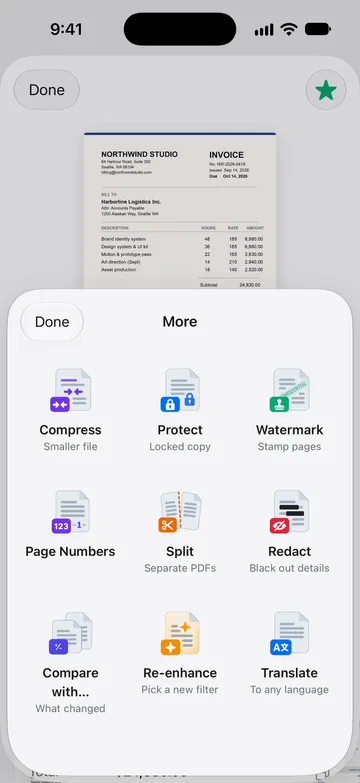
Open either version, tap More, then Compare with…, and pick the other version. Documents without text are dimmed in the list.
-
Read the list of changes
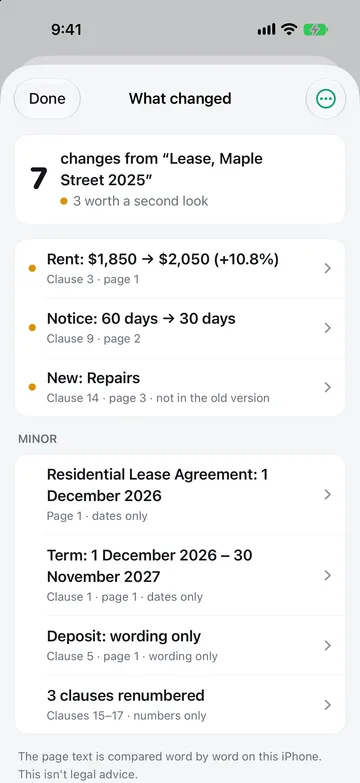
The top card counts the changes and how many are worth a second look, each marked with an amber dot. Those come first: here the rent, with its old and new amounts and +10.8%, “Notice: 60 days → 30 days”, and “New: Repairs”, a clause the old lease didn’t have. Then the rest, then Minor: dates only, wording only, clauses that moved, and renumbering, such as “3 clauses renumbered”.
-
Open a change
Tap a row to see its clause between its neighbors. Changes shows added words in green and removed words struck through in red; Old and New show each version on its own. Why it’s flagged (or About this change) says what kind of change it is, and Next change walks down the list.
Scanner One takes the document that came into it first as the old version. If you scanned the old one second, tap the ⋯ button at the top, then Swap Old and New.
What it compares, and what it ignores
The comparison follows fixed rules and runs on the iPhone:
- Clauses: Both texts are split at clause numbers (9., 3.1, Section 3) and at headings in capitals. A letter or a policy with no numbers is compared a few sentences at a time.
- Pairs: Clauses are matched by their wording, not their numbers, so a clause inserted in the middle doesn’t make every later clause look changed. The renumbering shows once, as a minor change, and a clause that moved with the same words is minor too.
- Words: Each pair is compared word by word. Line breaks, page breaks, page numbers, a header repeated on most pages, capital letters, curly quotes and words split by a hyphen at a line’s end don’t count as changes.
- Flags: A change is worth a second look when an amount or a percentage changed, when a number of days, weeks, months or years changed in a clause about notice, ending or renewing, or when it adds a payment or a duty, such as “shall pay”, “responsible for” or “at the tenant’s expense”.
It doesn’t judge whether a change is fair, and it isn’t legal advice; the screen says so under the list. If a change matters, ask the other side about it before you sign, and for anything serious, a lawyer. With Cloud AI switched on, Folio may rewrite the short labels in plainer words: the changed clauses are sent for that, and Folio can’t add or remove a change.
What changed is part of Pro: monthly, yearly with a free week, or lifetime (see the prices). On a free account, Compare with… opens the Pro offer.
If something goes wrong
- It says a version “has no text to compare”. That document has no words yet, usually a long scanned PDF that was imported as it was. Open it, tap Make Searchable, and compare again.
- A change that isn’t really there. On a scan, a misread letter or digit shows as a change. Check the redline against the paper, and scan the page again flat and in even light if it matters. Slips that only move punctuation, like a dot read where a comma was, are ignored.
- Almost everything is listed as changed. Scanner One found no clause numbers it knows (it reads 9., 3.1 or Section 3, not letters or Roman numerals) and no headings in capitals, so it compared the text a few sentences at a time, and one added sentence shifts the passages after it. Read the redlines in order: the green and red words show where the text really differs.
- The contract isn’t in English. It’s still compared word by word, but the rules for amounts, periods and dates read English, so fewer changes are flagged and fewer date changes go to Minor.